
Private, on-device · Windows beta
Every big conversation, rehearsed before it happens.
Klatea is a prep studio and live copilot for the meetings that count: client calls, the interviews you run, pitches, job interviews. It researches, drills you in a mock session, then sits beside you in the real call. Everything runs on your machine. Nothing leaves it except the prompts you choose to send.
Free while in beta · No account · Your transcripts never leave your computer
This is what a meeting feels like with Klatea listening.
A real scenario, replayed: a discovery call where the client speaks Arabic. Klatea transcribes both sides, translates locally, and whispers help when it matters.
A scripted simulation of the live screen. The transcription, translation and suggestions in the real app are generated on your machine, live.
One loop, four moves.
Klatea follows the shape of a real high-stakes conversation: you prepare, you walk in, you get help, you learn from it.
-
1
Prepare
Drop what you know: a client's website, a CV, a job posting. Klatea researches it, builds a question bank tailored to you, and drills you in a mock session that scores every answer.
-
2
Go live
Start the meeting. Klatea hears both sides through your mic and system audio, transcribing in real time on your GPU. Your cheat sheet rides along in the side rail.
-
3
Get help
When they ask something hard, a suggested answer appears. Tap any line for help with exactly that sentence, run a quick web research, or type your own instruction mid-call.
-
4
Debrief
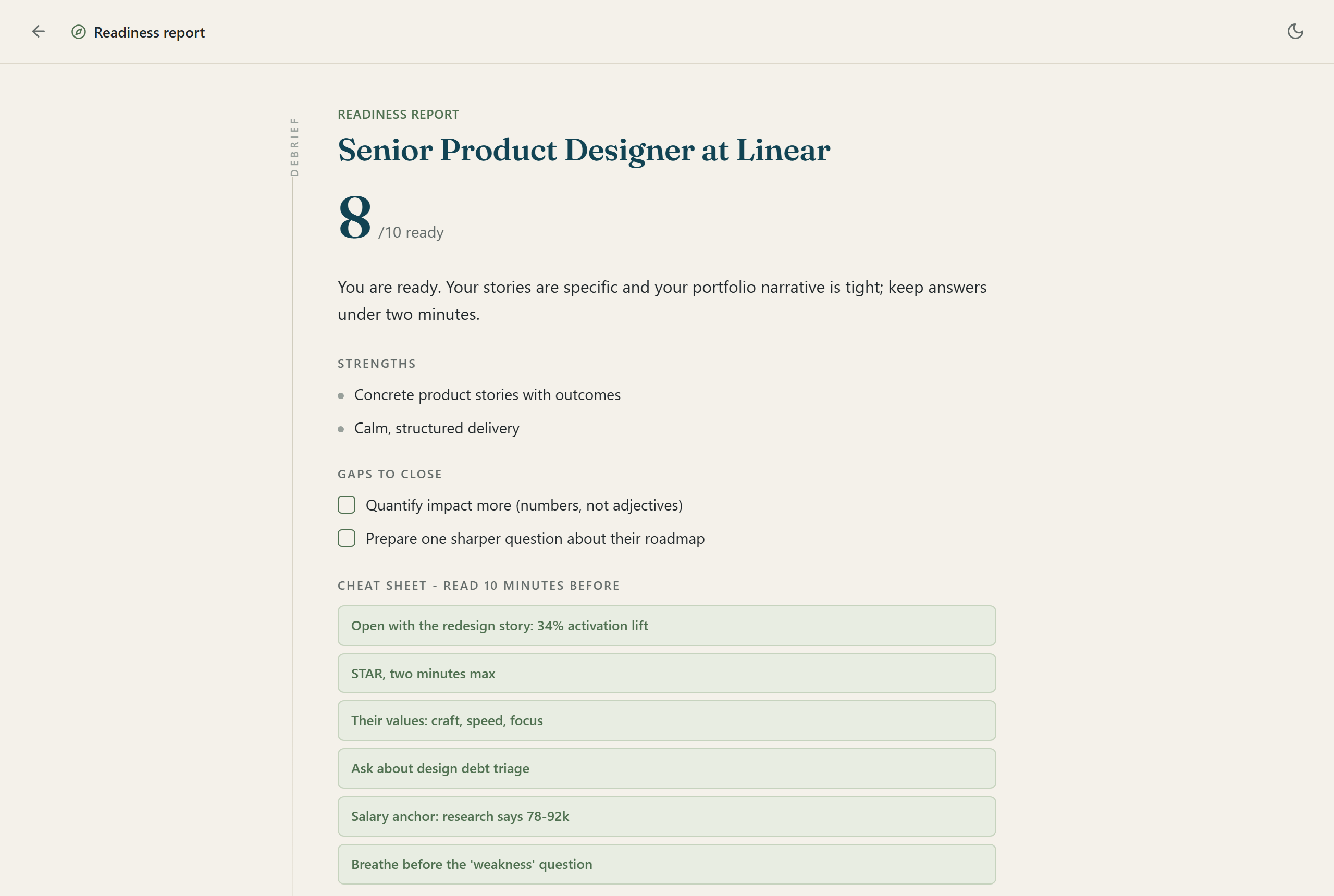
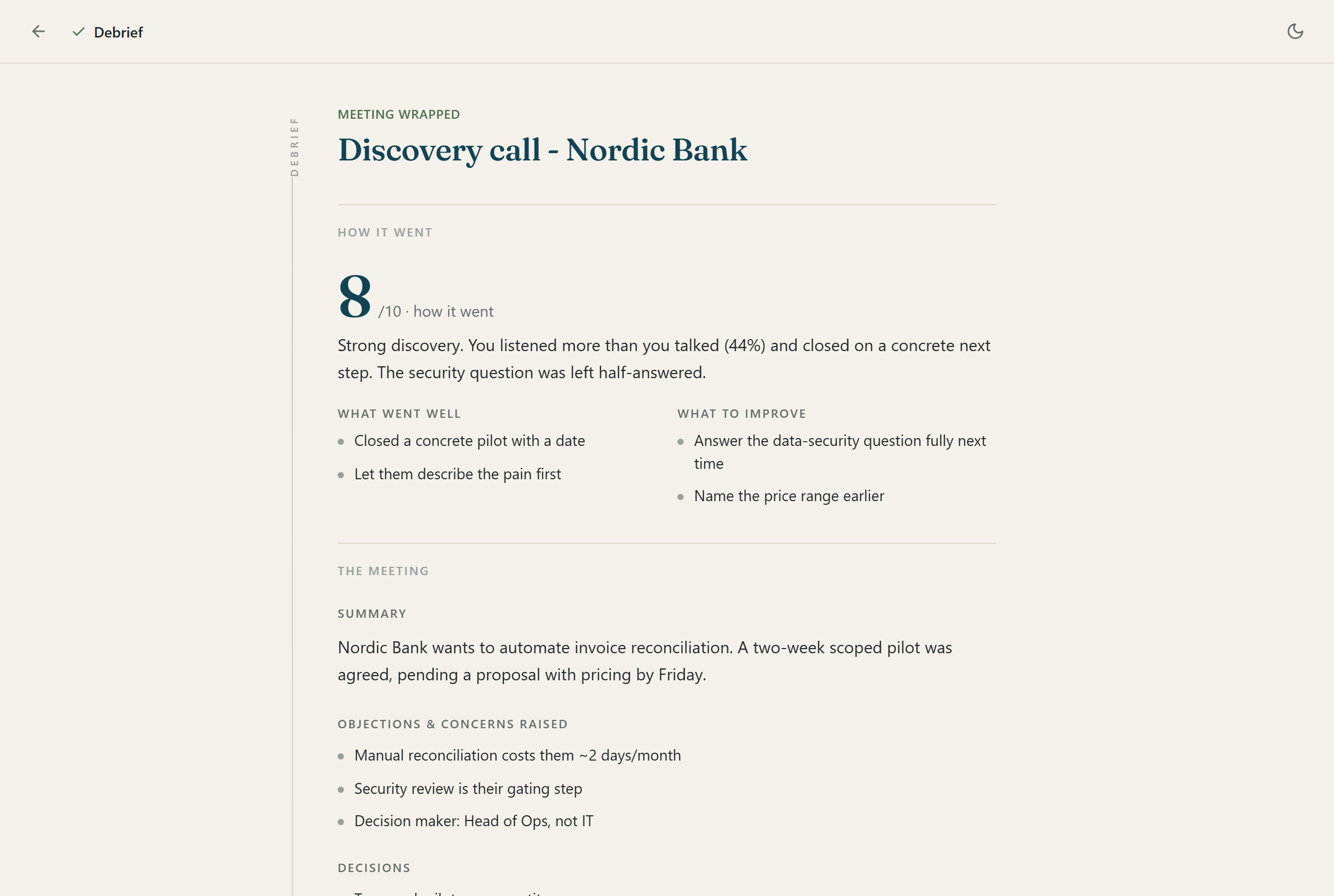
When you hang up: an honest score out of 10, what went well, what to improve, action items you can tick off, a follow-up email draft, and ready-to-paste prompts for whatever you agreed to build.
Your client speaks Arabic. You do not. It works anyway.
Turn on live translation and their words appear in your language as they speak, while your replies show in theirs in a second window you can share on screen. The translation model runs on your GPU. No cloud API, no per-minute fees.
- 12 languages including Arabic, Chinese, Hindi, Spanish, Portuguese and French
- Fully local translation model, about 650 MB, downloaded once
- Auto-detect picks up their language from the first sentences
Private by design, not by promise.
Audio never uploads
Transcription runs locally with Whisper on your GPU. Translation runs locally too. Your conversations are processed and stored only on your computer.
You choose what leaves
The only thing that ever goes out is the short prompt text sent to your own AI assistant when you ask for a suggestion or a summary. You can read every word of it.
Built for your own meetings
Klatea is a preparation tool and a copilot for meetings you run. It is not built for passing off whispered answers as your own; the prep studio exists so you do not need to.
Klatea in a minute.
The whole loop, prepare to debrief, in under a minute.
Prefer the details? Watch the two-minute tour.
Every screen of the real app: prep, mock, report, going live, translation, and the debrief.
Then go deeper, one meeting at a time.
Four short tutorials, one per scenario: the client call, the interview you run, the pitch, and the job interview.
Get Klatea.
Free while in beta. If you would rather not touch a terminal, we will set it up with you.
Free beta
$0
The full app, every feature. You install it yourself in about 15 minutes with the step-by-step guide.
- Windows 10 (2004+) or 11
- Python 3.13 on your PC
- A signed-in Claude or Codex CLI
- NVIDIA GPU recommended, CPU works
Set up for you
from $249
A JQ AI SYSTEMS engineer installs and configures Klatea on your machine, connects your AI account, and walks you through your first prep and live meeting in a one-hour session.
- Remote installation and configuration
- Your microphone and audio tuned
- One-hour guided walkthrough
- 30 days of setup support
- Sessions available in US time zones
Pro
$29/mo · coming soon
One-click installer, bring your own API key, no terminal at all. Join the list and we will tell you when it ships.
- Self-serve installer
- API key instead of a CLI
- Priority support
Honest questions.
Do I need a powerful computer?
An NVIDIA GPU makes transcription fast and is recommended. Without one, Klatea falls back to your processor automatically: everything still works, just slower.
Why do I need a Claude or Codex CLI?
Klatea uses the AI subscription you already have instead of charging you per token. You sign in once to the Claude Code CLI or the OpenAI Codex CLI, and Klatea talks to it. The upcoming Pro version will accept a plain API key instead.
Does it work offline?
Transcription and translation are fully offline once the models are downloaded. Suggestions and summaries need a connection, because they use your AI assistant.
Where is my data stored?
In a folder on your computer, as plain files and a local database. You can open it any time from Settings, and deleting a meeting deletes its files too.
Which languages does it understand?
Transcription follows Whisper and handles dozens of languages with auto-detect. Live translation supports 12 languages, including Arabic, Chinese, Hindi, Spanish, Portuguese, French and German.
Is there a Mac version?
Not yet. Klatea uses Windows audio capture to hear both sides of a call, so the beta is Windows 10 and 11 only.
How is it free? What is the catch?
The beta is free because it is early and we want feedback. Paid setup exists for people who want it working without touching a terminal, and a Pro license will come later. There is no data catch: your conversations stay on your machine either way.